

Official Payment Methods
Secure Payments for WebXmart & WebXPro
Welcome to the official payment information page for WebXmart.com and WebXPro.pk. We are committed to providing our customers with a secure, transparent, and reliable payment process.
Please review our authorized payment accounts carefully before making any payment for website development, domain registration, hosting, or other digital services.
Important Payment Notice
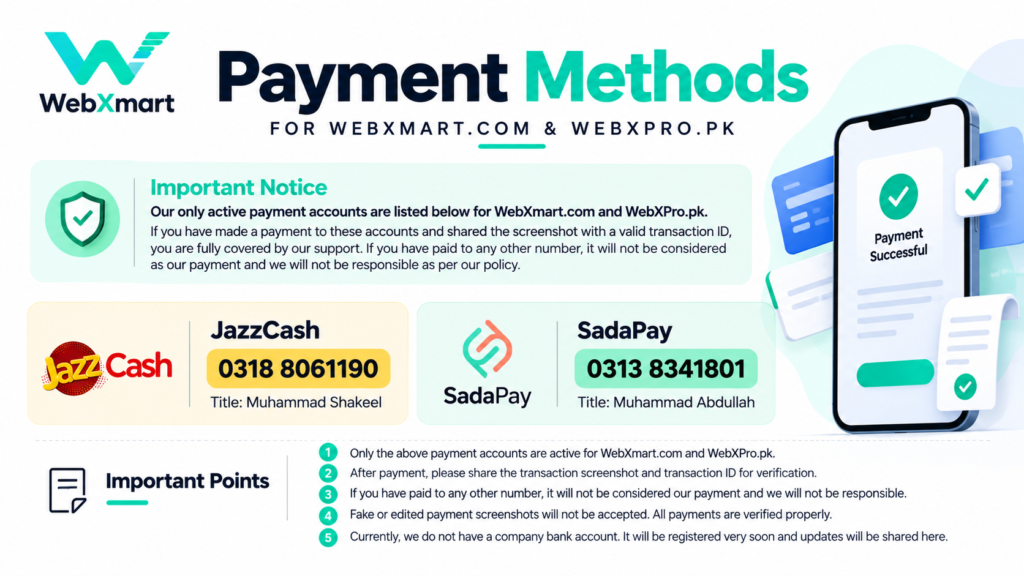
Only the payment accounts listed on this page are currently authorized to receive payments for WebXmart.com and WebXPro.pk.
These account details have been officially provided and approved by the company’s Founder & CEO.
For your security, please verify the account number and account holder’s name before transferring any amount.
Payments made to unauthorized accounts or third-party numbers are not recognized as official company payments. We cannot accept responsibility for transfers made to accounts that we have not authorized, subject to applicable law.
Our Authorized Payment Accounts
JazzCash
Account Number: 0318 8061190
Account Holder: Muhammad Shakeel
Payment Status: Active
Available for payments related to WebXmart.com and WebXPro.pk services.
SadaPay
Account Number: 0313 8341801
Account Holder: Muhammad Abdullah
Payment Status: Active
Available for payments related to WebXmart.com and WebXPro.pk services.
How to Make a Payment
Step 1 – Select Your Service
Choose your required service, such as website development, eCommerce website development, domain registration, or hosting.
Step 2 – Confirm Your Payment Amount
Confirm the final amount with our team or refer to your official invoice before making a payment.
Step 3 – Transfer Your Payment
Send the payment to one of the authorized JazzCash or SadaPay accounts listed above.
Step 4 – Share Payment Confirmation
After completing your payment, please provide the following details:
Customer Full Name
Invoice ID or Order Number
Payment Amount
Payment Method
Transaction ID
Payment Screenshot
Payment Date
Step 5 – Payment Verification
Our team will verify the transaction details against the relevant payment account records.
Your payment will be marked as confirmed only after successful verification.
Payment Verification & Security Policy
To protect our customers and business from fraudulent transactions, all payments are subject to verification.
Submitting a payment screenshot does not automatically confirm a successful transaction.
We may check the transaction ID, payment amount, recipient account, and transaction status before confirming an order.
Fake, edited, manipulated, or misleading payment screenshots will not be accepted.
Orders will be processed according to the agreed terms after payment verification.
Unauthorized Payment Disclaimer
WebXmart.com and WebXPro.pk recognize only the authorized payment accounts published on this page.
If a payment is sent to an unlisted personal account, mobile wallet, or bank account without our official authorization, it will not be treated as a verified company payment.
Customers are strongly advised to verify payment details through our official websites before transferring funds.
If you suspect payment fraud or have accidentally transferred money to an incorrect account, contact your payment provider immediately and inform our team.
Company Bank Account Update
Official Company Bank Account: Coming Soon
At present, we do not have an active company bank account available for customer payments.
Our company bank account setup is planned, and the official details will be published on this page once the account becomes available and is verified.
Until then, please use only the authorized JazzCash and SadaPay accounts listed above.
Frequently Asked Questions
1. Which payment methods does WebXmart accept?
WebXmart currently accepts payments through the authorized JazzCash and SadaPay accounts listed on this page.
2. Are these payment accounts valid for WebXPro.pk?
Yes. The listed payment accounts are authorized for payments related to both WebXmart.com and WebXPro.pk.
3. Is a payment screenshot required?
Yes. Customers should provide a payment screenshot along with the transaction ID and relevant order or invoice details for verification.
4. What happens if I send payment to another number?
Payments made to unauthorized accounts are not considered verified company payments. Please contact your payment provider promptly if you have transferred money to an incorrect account.
5. Can I submit a screenshot without completing the payment?
No. All payments are verified. A screenshot alone is not proof that funds have been received.
6. Does WebXmart have an official company bank account?
Not currently. Updated bank account information will be published on this page when an official company account becomes available.
7. When will my payment be confirmed?
Payment confirmation depends on successful transaction verification. Processing times may vary according to the payment provider and transaction status.
Need Help With Your Payment?
If you have questions about your invoice, payment amount, transaction verification, or order status, please contact our team through our official websites.
Official Websites:
Your Payment Security Is Our Priority.
Always verify the recipient details before making a payment and keep your transaction receipt for future reference.